According to eCommerce development industry reports, by the end of 2013 it is expected that more people will access the internet through mobile devices than through desktop or notebook computers, and yet, only 10% of all sites are currently optimized for mobile browsers. In addition, analysts predict that by 2015 in excess of $31 billion dollars will be spent by those accessing the internet through their mobile devices.
eCommerce Development – Focus on Mobile Accessibility
Companies would be wise to invest in making their sites more mobile friendly; in fact, of users surveyed, 67% said they were more likely to buy from mobile-friendly sites than their less accessible counterparts and 61% said they were quick to leave non-optimized sites in search of a more comfortable shopping experience. According to the survey data companies attempting to become more mobile friendly should focus on two areas specifically: company info (hours, locations, etc) – with click-to-call functionality; and ease of use (bigger buttons, save functions, and fewer clicks-to-target)
Thanks to Baynote, Flurry, and GetElastic, we’d like to share a new infographic tracking the efficacy of retail apps for mobile. It’s important to note that consumers spent 132% more time overall using various mobile apps compared with last year’s figures—this is a growing trend, well worthy of our continued attention. Let’s take a look at some notable conclusions:
By type, time spent on mobile apps breaks down as follows:
• Social: 387%
• Media & Entertainment: 268%
• Shopping: 247%
• Productivity: 237%
• Utilities: 206%
• Travel: 198%
• Gaming: 107%
The extreme growth in the Social and Media & Entertainment categories points toward rapidly expanding possibilities both in terms of advertising and social-media-native retail extensions. And, of course, shopping apps themselves are right behind in 3rd place.
Year-over-year, retailers experienced a solid jump in time spent per shopping category, compared with general stagnation or decline across other aspects. Between 2011 and 2012:
• Retailers jumped from 15% to 27% of users’ time allotment
• Online marketplaces fell from 25% to 20%
• Purchase assistants fell from 18% to 17%
• Price comparisons remained the same at 14%
• Daily deals fell from 20% to 13%
Ultimately, the status quo is embracing design-friendly, attractive mobile apps that better appeal to users’ needs and sensibilities. Still, we must remember that mobile technology as a field is still barely out of its infancy. Further efforts must be made to convert mobile users to retailers’ apps from third-party platforms.
From the fine folks at Glamour Magazine comes a startling insight about Michelle Obama’s taste in tech. Apparently—well, apparent if you’re a fan of fallacy-filled syllogisms—the First Lady is quite fond of a certain New York Magento Development company (hint: it’s Hara Partners).
See, Mrs. Obama—already heralded by many in the fashion community as a haute-couture treasure-hunter of sorts for her ability to unearth fashion finds (see Wu, Jason)—was recently photographed wearing a top by the Brooklyn-based label SUNO (that’s the Mrs. O loves SUNO part of the title). What the Glamour folks don’t know is that SUNO also has impeccable taste…in Magento Development companies (oh snap!). That’s right, Hara Partners (yes, THE Hara Partners) is the party behind www.sunony.com, the clothiers’ fantastic U.S. website (that’s the SUNO loves Hara Partners part).
I’m sure those of you well grounded in classical logic don’t need me to spell this out, but I’ll do it anyway for the rest of us:
Fact 1: Michelle Obama loves SUNO
Fact 2: SUNO loves Hara Partners (what’s not to love, amirite?)
Ergo, (prepare for mind-blowage) “Fact” 3: Michelle Obama MUST love Hara Partners!!!!!
Developing for Magento can be a tall order—the sheer volume of tools, users, and extensions means that you’ll inevitably run into some tough issues. That’s to be expected, of course, but getting at the root of these problems can pose additional problems in terms of time, labor, and cost. You needn’t waste resources, especially when they would be better to use in furthering your business objectives. Our Magento Health Check is designed to run a meticulous Magento audit of your entire platform, ferreting out inconsistencies, bugs, misconfigurations, incompatibilities, and a host of other frustrations.
I’m a store owner with little to no technical acumen. Why do I need a Health Check?
The Health Check gives you an unbiased, informed, easy-to-grasp picture of your platform as a whole. You’ll get a clear sense of how your developers compare to standard Magento best practices, and you’ll get answers to the questions you shouldn’t have to ask:
– Why is my store running/loading so slow? What happened to its performance?
– Why did my settings change when I upgraded?
– Why doesn’t this extension work?
– Why do customers keep complaining about interactivity?
You’ll walk away with a graphic-rich report, complete with advice on how to resolve all of your issues. We’ll even point out additional ways to optimize your system, which comes in handy when you have to upgrade or migrate data.
I’m a developer working on a Magento platform. Why do I need a Health Check?
Sometimes you don’t have time to hunt all over your platform to clear up violations. Sometimes you want to be sure that you can try a new module without disrupting a healthy status quo. You may even want to prove to your team lead that your work stands up to scrutiny. Or you may have been asked to work on a new site, and you want to know what you’re getting yourself into before committing. The list goes on! In your case, the important things to consider are the speed and comprehensiveness of our Magento Audit. We’re all blind to our own human error, after all; with the Health Check, you can be sure that your work serves as a strong foundation to a working e-commerce site.
What Else?
Magento audits are a great way to inaugurate a successful business relationship. We often suggest them as a way to get everything on the table, as it were. From there, it’s clear to both parties why and where work needs to be done, and we can showcase the reliability and efficacy of our team in restoring a sick Magento system. Because of its complexity, Magento daunts many a capable techie, but it’s a thing to behold when it’s running correctly—ROI, conversions, and performance all attest to that. We’re confident in our team’s ability to end Magento issues, even on custom or enterprise-scale platforms. We’ve been with Magento from the get-go, and we know how to make it sing.
Check out our unique, effective Magento audit service today with the Hara Partners Health Check!
Magento is an open-source, enterprise level, eCommerce solution. The open-source nature of the industry’s leading platform means users have greater
Magento
control over their eCommerce sites and thus unprecedented flexibility in designing and operating them. Additionally, being open-source means that the code is available for download free of charge on Magento’s website. Along with the benefits of being open-source, Magento offers some more tangible advantages as well, like being scalable to fit even the largest company’s needs, and a massive library extension themes and add-ons, as well as others.
Getting Started with Magento.
The first step towards your new eCommerce store is to find the right partners to help you throughout the process and beyond; including hiring the right Magento developer, and finding the right Magento hosting company.
Once your team is assembled the next steps are downloading ad installing the software. As mentioned above, the download is available for free at www.magentocommerce.com download, in two versions: the installer version which is good for most users; and the full version, which is for user who plan to run multiple versions of Magento simultaneously. The installation is somewhat technically advance, and to cover it in depth would be beyond the scope of this article, but in short the steps required are:
Saving the files on your webserver.
Creating a MySQL database and designating the appropriate user permissions
Navigating PHP versions conflicts.
At this point use your web browser to find your online, site-specific, Magento installation wizard (for example if you’ve uploaded your Magento files to http://www.example.com/magento/, then the wizard will be located here: http://www.example.com/magento/.
Once in the wizard you can manipulate the settings to fit your site. Most of the settings will be pre-filled with best-fit answers but all can be changed if need be. At the very least you’ll need to edit the “Database connection” field to match what you’ve made in step 2 above.
That’s it! Now you can visit the backend of your store and begin to configure your new eCommerce site.
In part II of Getting Started with Magento we’ll take a look the Admin panel and begin to learn some of the jargon.
Financing has long been considered one of the hallmarks of retail status: when you could offer customers long-term payment options you knew you had made it to the big-time.
Now a Magento Extension
And it’s no wonder financing is such a coveted offering, since per industry reports from Forrester Research offering financing leads to a 5.7% sales increase over a 3-year period and to an increase of 75% in average order value. Now, any Magento user can be king of his hill: Introducing Bill Me Later from PayPal now for Magento.
Add the Bill Me Later Magento Extension
Getting access to the app is simple, just go to PayPal’s website and sign up, then choose your preferred banner and embed the code in your website. That’s it – there are no added costs or risks involved and there is zero integration or installation required – everything is already contained in the standard PayPal platform you’re already using. Once you’ve embedded the code your customers will be offered Bill Me Later as one of your approved payment options, and they can choose to take advantage of up to 6 months of financing. Whatever PayPal option they choose, you’ll still get paid immediately, as usual.
Unless you don’t like making money, I can’t see any reason why you would add this functionality. There are no risks, no costs, and no hassle – really no downside at all; this is one Magento development that we can all get behind.
Welcome back to Part II of our series on Magento SEO, derived from Yoast’s comprehensive coverage on their net hub. Last time, we covered the basics of configuration and technical SEO for Magento. Today we’ll cover templates and some advanced Magento SEO techniques to truly pump your sites’ optimization game to the next level. It may seem like a lot, but feel free to be incremental; as long as you’re careful, you can take these step-by-step if you need to.
Each element does some good on its own, and in tandem they constitute a powerfully grounded Magento SEO strategy. Let’s begin!
Magento Template Optimization
Skins
Magento’s out-of-the-box skins—“Default Theme”, “Blue Skin”, “Modern Theme”—aren’t all that header-friendly, so it’s in your best interest to seek out custom, blank themes with room for SEO elements.
Headings
You logo should be an <h1> on the front page and an <h3> thereafter. Basically, the content title should always be apparent as such. For example, on a product page, stick the actual name of the product in an <h1> tag. On category pages, reserve category names for <h1> and relegate included products to <h3>. This may seem like a no-brainer, but you’d be surprised how often this gets overlooked and how detrimental that can be.
On the flipside of the coin, overusing headings can hurt, too. Avoid them entirely in sidebars. There’s no reason to use <h4> tags for “static” or kewordless titles—use <strong> instead. And, of course, keep your content clean, organized, and relevant with the proper keywords.
Neaten Your Code
You’ve got to keep your templates clean! Move your JavaScript and CSS to external files; the more cluttered your templates, the worse your Magento SEO report card will be. The benefits? Users will be able to cache those files on the first load, and search engines usually won’t have to download them. Everybody wins!
Speed Up
Speaking of which, the daily amount of your pages a search engine can spider is directly proportional to the speed at which your shop loads. So how do you get faster?
1. Enable caching via System -> CacheManagement. Be sure to enable all caching features there.
2. Don’t skimp on hosting/server configuration. MySQL and PHP opcode cache make a huge difference.
You’ll also want to reduce the number of external files, combining them wherever possible (Magento already combines most JavaScript files into one by default). Remember that each file visitors have to download requires their browser to create another connection to the webserver. A great place to start is with stylesheets, which the default template keeps separate in six different files. Go ahead and combine everything but print.css into one file.
Modules exist which make this process easier, and some will also compress and cache, as well. Know that these may require rewrite permission and/or .htaccess support.
Advanced Magento SEO
You’ve come this far—don’t give up on the final lap! From here on out, it’s all about eliminating duplicate content. Unfortunately, some of our natural tendencies translate to duplicate content on Magento, which is a huge no-no when search engine spiders come around. For example, if you’ve got a certain product, it’s reasonable to expect that its page’s URL might look something like:
www.example.com/product.html
Which is all fine and dandy, except what happens when you link to that page from a category page further up the hierarchy? Something like:
www.example.com/category1/product.html
Similarly, you may end up with even more instances of “duplicate content” in the eyes of search engines, pages like:
And that’s not even getting into product review subpages and the like. Long story short, this is a serious problem that falls under the radar of most casual Magento SEO campaigns. People create these issues because we all love layered navigation and other modern site practices that give more options to visitors; redundant options are eminently user-friendly, but they certainly aren’t SEO-friendly.
The answer? Set up your site to permit spidering instead of indexing, and adjust sorting/navigation. Here’s how:
Non-content Pages
For these pages, use the “Noindex, Follow” protocol. You’ll need a meta module or extension to do this. This way, search engines will follow all links on these pages, but it won’t index them in the process.
Don’t link to login, checkout, wishlist, or other non-content pages. The same goes for RSS feeds, layered navigation, add to wishlist, add to compare, or other buttons/features. Unfortunately, as of this writing, there’s no easy extension for this. You’ll have to go into your template files and manually add “nofollow” to these links yourself.
Canonical URLs
You’ll need an extension for this, as well. Use the new “canonical URL” tag to suggest your preferred version of the URL for each page, which helps search engines differentiate between sites it might otherwise label as duplicate content.
XML Sitemaps
This won’t help you rank, but it can speed up indexing because it makes it easier for search engines to find your content. You can create an XML sitemap manually by navigating to Catalog -> GoogleSitemap -> AddSitemap. From there, choose a file name, path, and store view, then press “Save and Generate”. To point search engines towards the sitemap, insert the following code in your robots.txt file:
Sitemap: http://domain.com/sitemap.xml
NOTE: as your inventory changes, you’ll need to continually re-generate the XML sitemap. The best way to do that is via a cron job.
Wrapping Up
And that’s it, for now! Because this is an evolving field, expect Magento SEO tactics to change in the coming months and years. It’s about aligning with search engine parameters, after all. Plus, Magento being the open-source platform that it is, it’s highly possible that many of these are being incorporated into Magento core even now. Please get in touch with us if you have any questions, comments, or if you’d like to see what we can do for you in terms of a Magento SEO campaign. We’d be glad to help!
SEO! Magentians everywhere, those three letters should be the bedrock of your web strategy—they determine positioning, reception, marketing initiatives, and a host of other crucial undertakings for online businesses.
Chances are you’ve already done a fair bit of SEO, but even a cursory glance around the web shows a distinct lack of Magento SEO advice.
This is less than ideal.
Luckily, Yoast put together a dynamic overview of Magento concerns, tactics, and workarounds in the SEO realm! That’s right: as Magento evolves and best practices come into their own, Yoast will keep updating their piece to reflect the changing landscape. In the meantime, though, we’d like to put the spotlight on the existing, proving Magento SEO information. As the first article in a two-part series, this piece will cover Basic Optimization Strategies. The second part will delve more into issues with templates and advanced tips for a fully executed Magento SEO strategy. Let’s get to it!
Basic Technical SEO for Magento
General Configuration
Caveat: the following assumes that you’ve updated to the most recent Magento release. If you need to do so, check the Magento website for instructions on modernizing your platform.
Firstly, you should know that Magento gets cozy with search engines right off the bat. They take you most of the way there—but you need to address a few issues to achieve ideal optimization. Start by enabling Server URL rewrites under System -> Configuration -> Web -> Search Engine Optimization. On that same screen, under URL Options, set “Add store code to URLs” to “no” (in some rare cases, you might want a “yes” here—feel free to contact us if you’re unsure and we can give a more informed answer).
Under Unsecure/Secure, you’ll be able to set your preferred domain in the “Base URL” field. Basically, this lets you opt between www and non-www versions for your URLs. NOTE: this won’t automatically redirect from one to the other. To do that, create a 301 redirect through .htaccess with mod_rewrite; this has the additional benefit of preventing Magento from adding the SID query to your URLs. You’ll want to make sure the Base URL is the same as the redirect. The following code can be added when editing .htaccess to redirect index.php to root:
Alternatively, if you Magento install is in the sub-directory http://www.mydomain.com/magento/ instead of the root:=
1    RewriteBase /magento/ RewriteCond %{THE_REQUEST} ^[A-Z]{3,9} /magento/index.php HTTP/

2    RewriteRule ^index.php$ http://www.mydomain.com/magento/ [R=301,L]
Header Settings
Magento automatically outfits you with “Magento Commerce” as a page title. You don’t have to just leave that, do something about it! In general, live by this mantra: “early words count more”. Not only do search engines put more weight on the first few words, visitors often can’t be bothered to read the entire line when they’re in a hurry. So stick your keywords up front!
To change the default title, navigate to Configuration -> Design -> HTMLHead. Be descriptive and concise with this title; it’ll be used for your non-content pages without custom titles (e.g., “Contact Us”). Use the “Title Suffix” field to add your store name to all pages, should you desire.
Just a few more things to clean up your site. To save space in your title, leave “Prefix”, “Default Description”, and “Default Keywords” empty. Also, if you want to prevent indexing of the site (say, for a non-production environment), it may be useful to set “Default Robots” to “NOINDEX, NOFOLLOW”—otherwise, it should definitely be set to “INDEX, FOLLOW”.
Another great way to improve Magento SEO on page headers is to add new canonical tags, available through various extensions on Magento Connect. NOTE: Magento has a tendency to turn non-set meta robots into meta tags, as in:
<meta name="robots" content="*" />
If this happens, you should remove these empty metas from your code to avoid troubling search engine behavior.
CMS Pages
Magento favors simple CMS, which usually suffices for most purposes in terms of scope, flexibility, and page aspect control. Keeping in mind the search-engine friendly tips above, fill each CMS page with well-written content, select a URL Identifier and Page Title, and pen a corresponding description. You can keep “Keywords” empty.
Remember that the description is the human element: it should entice clicks when presented in search engine results, so be sure to grab their attention with a straightforward hook. Do not resort to auto-generation. This shows up far too often and is fairly obvious to most savvy searchers. You’ve seen it before: two or three random snippets with bolded keywords, separated by ellipses. Distinguish your efforts with readable descriptions.
Category Optimization
Magento also defaults to adding category names to paths for product URLs, which has the unfortunate side effect of creating (often-penalized) duplicate content issues for search engines. To disable this function, set “use category paths for URLs” under System -> Configuration -> Catalog -> SearchEngineOptimization to “no”.
To set details by category, navigate to Catalog -> ManageCategories. The most important fields are:
• MetaDescription – again, an attractive description that humans would want to read.
• PageTitle – keep this empty so that parent categories will populate in your titles. If you customize here, Magento will use your exact entry without including parent categories.
• URLKey – again, short and keyword-rich! Drop articles (a, an, the) and other space-wasters. If you cater to multiple languages, you should keep this language-independent.
Product Optimization
This follows a similar procedure to CategoryOptimization. You’ll be able to set meta information for “Default Values” and for each “Store View”. NOTE: for “Meta Title”, custom entries will overwrite the complete page title except for prefixes/suffixes, not just the product name.
Images need love, too! Both alt tags and image file names contribute to search engine success in the big picture. Not only that, visitors using screen readers will then be able to have a good idea of what’s in front of them.
By default, images will be renamed with the product title, which also populates the “Title” and “Alt Tag” fields. It may take some effort, but it’s ultimately worthwhile to reset these for each image. You should know that you can also set the label for each product image (including alt and title tag) in the “Images” tab under ProductInformation. This applies to specified Store Views, as well.
That’s it for Now!
Be sure to check out Hara Partners’ page on Magento SEO—lots of useful information to be found there!
For all the features it gets right, sometimes Magento unintentionally hobbles businesses through default functionality. One of these key oversights is in the order numbering scheme, which also encompasses invoice numbers, shipment numbers, and credit memo numbers. Default numbering begins at 100000001 and increments up from there, which can be problematic for the reasons listed below. Luckily, as with most Magento functional areas, a number of extensions exist to optimize order numbering. Why would you want to do that?
They Reveal Private Information
Let’s say a customer orders a shirt, then decides to get a matching shirt one week later. With Magento’s default order numbering, they might be able to estimate turnover by comparing numbers. Now imagine how easy it would be for a competitor to get that same business information. It’s the principle of the matter—no one should be able to hack your sales figures quite so easily. Also, who would want to be customer #1, or even #10? You shouldn’t have to disclose that kind of sensitive information.
They Don’t Fulfill their Potential
There’s all sorts of information you can encode into the order number. This can be redundant, sure, but you definitely don’t want to be in a position where you’re lacking crucial information when an issue comes up. Multiple stores? Need to distinguish between order number types? Dates and times? All this and more is possible and customizable. Many elements dynamically change to reflect conditions at point of sale.
With the best extensions, you can set up simultaneous numbering systems, so that internal numbering can follow alternate logic to make things easier on your team or to preserve legacy record-keeping. Or retroactively adjust old order numbers to achieve across-the-board consistency!
They’re Unwieldy
While it isn’t as much of an issue, it can be a headache for customers to rattle off a 9-digit order number when they have questions or problems. A more sensible numbering scheme cuts down on human error and avoids confusion or aggravation where it matters most. Some extensions permit you to tool with the length, increment number, or even the alphanumeric makeup of order numbers.
Be Aware…
Of course, just changing your ordering scheme doesn’t solve every problem, and there are a few things you should know beforehand. In no particular order:
• Changing length or content could involve rewriting Magento core code. Whether or not this is accomplished automatically during installation and setup of the extension, it may cause headaches come update time. Magento updates have a tendency to reset the core code, which may render extensions incompatible.
• As with many extensions, you may have to spring for the pro version to get all the functionality you want. This article is a great starting place, but it’s not a replacement for the diligent research that should go into any purchasing decision.
• If you use external systems outside of Magento, be prepared to analyze these integrations before, during, and after implementation. Don’t let customers point out malfunctioning modules for you! As a side note, this can be a great reason to use custom order numbers in the first place—if you’re already tracking orders on an external system, it makes sense to align with it within Magento.
We Can Help!
Last, but not least, you should know that Hara Partners successfully navigates Magento development, customization, integrations, and extensions for large and small organizations alike. If you’re considering Magento custom order numbers, we can walk you through the process and ensure a seamless transition. Contact us today to see what Hara Partners can do for you!
Magento, in early February 2013, announced, in an effort to support Enterprise user’s growth and success, plans to introduce company-wide changes, the first of which were to affect the Magento Solutions Partner program. As per the Magento announcement the changes to the partnership program are intended to make a partner company’s status more closely related to its abilities thus making the Magento Commerce Marketplace more utile for prospective clients.
The Program Requirements:
Under the old guidelines partners companies were grouped into three tiers: gold; silver and bronze, and status was mainly determined by the amount of the fee paid by the company. Additionally, each Solution Partner company was required to have a minimum number Magento certified developers on staff and meet a yearly revenue target mainly determined by number of Enterprise licenses sold. Unfortunately, these rankings did nothing to differentiate partners based on abilities or competencies and those searching through the marketplaces were left to fend for themselves in this regard.
The Changes
The new guidelines feature a change in the tiers used by the system: Gold and Silver levels remain but Bronze has been replaced by a new category, Magento Associate. The new rank is reserved as a nursery of sorts in which companies that wish to become partners but aren’t quite up to partner standards can take advantage of Magento provided resources in an effort to become partner eligible. Under the new guidelines all new Solution Partner Companies start as Magento Associates and must work their way up the ladder by meeting goals that include, in addition to the revenue targets and minimum certified developers, high customer satisfaction ratings and passing site audits performed by Magento ECG teams.
These changes are sure to make finding the right Solution Partner for your needs a far easier task than previously but will they go far enough to differentiate between companies of the same status? Only time will tell.
Magento e-Commerce Solution Partner Program Benefits
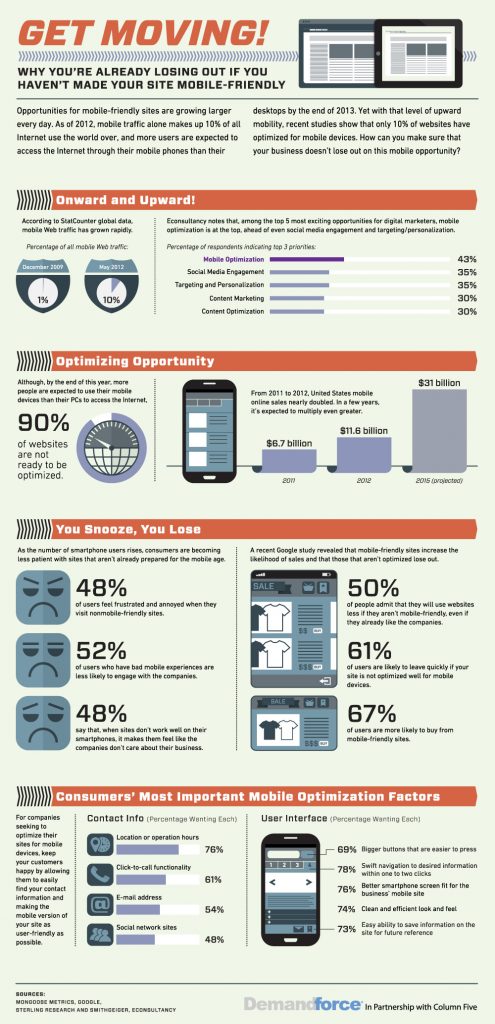

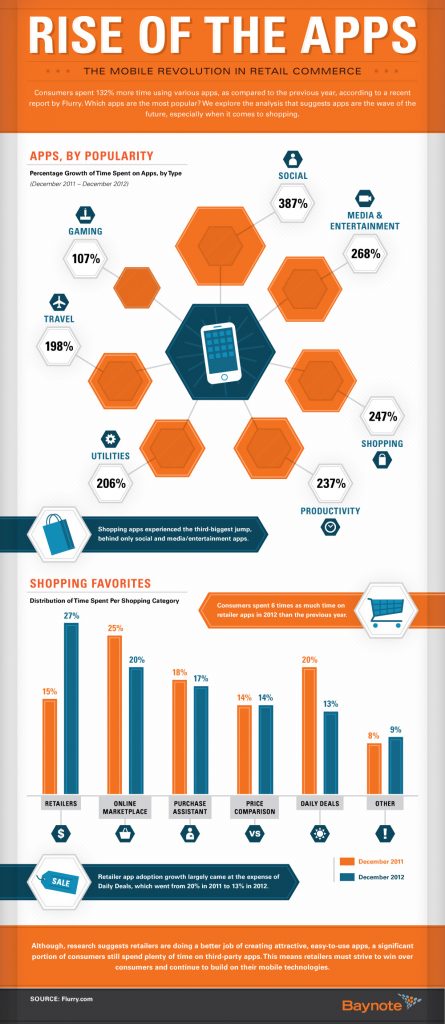







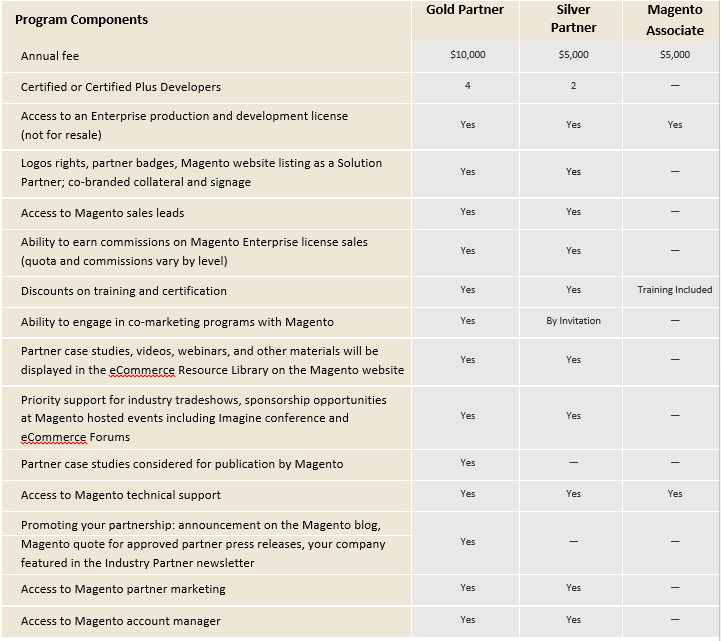 Image courtesy of www.MagentoCommerce.com