Magento Rich Merchandising Suite allows online retailers to put their customers into groups, so you can pitch directly to them and their interests. As a store owner, you will know exactly what your customer has bought or is thinking of buying, and you can see exactly what they are searching for; to this end, you will then be able to show them related products – for example, if a customer is searching for ‘laptops’, you will be able to show them specific products such as peripherals (external hard drives or mice).
It’s common practice by now to employ Google Analytics in your e-commerce arsenal to get the upper-hand in an e-commerce analytics/marketing campaign. But sometimes we need a little guidance to squeeze the most juice out of these reports; how do we use them best, where do we find the most pertinent information, and what can we safely ignore? Feras Alhlou put together an informative survey for Practical Ecommerce on this very topic. Basically, it all boils down to segmentation, or the willingness to parse aggregate numbers according to certain schematics or populations. Let’s see which insights prove the most useful!
#1: Segment by Traffic Channel
Here, you want to gauge each channel’s worth in terms of traffic generation and conversion rate. How? Start by looking at “Traffic Sources” in Google Analytics, which separates results into organic (unpaid) sources, referrals (outside sources directing visitors to your site’s URL), and direct traffic (visitors typing your web address or utilizing a bookmark). Segmenting by Traffic Channel gives you a crystal-clear picture of all the points of access to your e-commerce site, thereby enabling you to make important campaign decisions. This information is valuable because it lets you concentrate on sources that work and pull resources from those that don’t.
For example, if you saw that 70% or so of your traffic was generated via email, you might set a target of 85% in the next three months and divert a larger portion of your marketing budget to expanding your company’s email list in order to achieve that goal. On the other side of the coin, if you notice that social media drives hardly any traffic, you should make a point of analyzing why your tweets, posts, and social ads aren’t getting a response. Maybe you would need to focus on blog visibility, launch a social media contest, or look into guest posts to reach previously isolated audiences.
By presenting the data in a matrix, segmentation by traffic channel lets you correlate findings across media (email, social, etc.), transaction volume, average transaction value, and more. One of the most useful parameters is conversion rate, a measure of successful purchases by visitors. You can use Google Analytics to pinpoint your conversion MVPS—affiliate networks, say—as well as weakest links; this data is much more actionable than an average conversion rate, which won’t highlight performance outliers in real time. Your attention is better spent troubleshooting problem areas (e.g., why did the holiday sale flop? Confusing content? Buried links? Navigation woes?).
#2: Segment by Day of Week
While some variance between industries is to be expected, this can be extremely useful for gleaning customer habits. In this tool, you can compare visits, conversion rate, and revenue against a calendar week to settle issues of timing. It’s particularly useful in combination with segmentation by traffic. To continue our earlier example, let’s say that you’ve found Friday to be your site’s busiest day in terms of both traffic and revenue. It might be a great idea to take advantage of this by scheduling email blasts on Thursday night or Friday morning, boosting email conversion rates in tandem with proven traffic metrics. This ability to manipulate scheduling is a boon in any e-commerce analytics toolbox!
And it doesn’t stop there. Further segmentation permits granular control by hour, so that you might learn that lunch breaks are peak conversion points, or that traffic dips heavily during the morning rush hour. As with all Google Analytics campaigns, you can even set up custom reports to alert you to unusual activity or to confirm your findings over a predetermined window of time.
#3: Funnel Segments
E-commerce analytics have truly come a long way; going beyond channels and times, you can also learn quite a bit from your shopping cart funnels. While many might be content with a simple conversion ratio comparing the “Add to Cart” step to the “Checkout Complete” step, Google Analytics does you one better by (again) separating results by channel and providing results from each and every step of the sales funnel. Simply navigate to Conversions -> GoalFlowReports and select “Medium” in the dimension drop-down menu. This data is provided as a completion percentage (e.g., “28% of 5.09K total visitors completed this step”).
Here’s where it gets good: you can instruct Google Analytics to alert you to “micro-conversions” of your choosing. Using the same example from before, you might have to present a report comparing user response across several campaigns; you’d easily be able to set up a weekly alert on how many visitors were interested enough to add a product to their cart. If a large portion stopped there, you’re that much closer to the root of the problem, and you’d know exactly where to look in tooling around with future campaign variants.
What else? How about tracking repeat buyers right from Google Analytics? This valuable customer subset can provide excellent data on the long-term success of “tried-and-true” campaigns, including conversion rate, average order value, and the same funnel habits mentioned above. Once this report is established, you can then compare first-time and repeat buyers as a benchmark for informed decision-making down the line. The possibilities widen even further when you track the page from which users add products to their carts—the homepage, a promotion, and a banner might all have this capability—and/or whether guests opt to log in on the way to their first purchase.
According to a report from Forrester Research, 89% of marketers said email marketing was their primary channel for lead generation. A thoughtful piece from Carolyn Nye, posted on the practical ecommerce blog dissects email marketing, highlighting 5 areas of email marketing you can A/B test to improve your overall conversions from the campaign.
Email Marketing: 5 test to improve your results.
Subject Line Testing
The subject line has long been considered a way to get your email opened and nothing more. Recently, however, some industry tests and research has shown that your subject line can have an impact all the way through the channel – even affecting conversions. Use A/B testing to determine which subject line has the best results.
From Line Testing
The from line is generally the most emphasized line in an email interface, this is especially so on mobile platforms, so take advantage of the space with your name or company name or some combination of both. Avoid using the reply email address as that looks unpolished and impersonal. Again take advantage of A/B testing to determine which format produces the most conversions.
Offer Testing
This one is obvious: customize the offerings to fit specific fit customer segments. For example, a restaurant offering free kids meals to customer without kids is just a waste of time, use A/B testing for different offers, like dollar off vs. percent off, to find out which offers garner the most interest.
Landing Page Testing
Once your emails are opened there should be a strong “call-to-action’ in the body that leads customers to “click-thru” to the landing page for the offer, how you structure your landing page can make all the difference when it comes to conversions. Since there are so many variables present on your landing page lots of testing may be needed to really drill down to usable data, but remember to only change one variable per test so you know which specific elements add to conversions and which detract.
Testing for Deliverability
This is the forgotten test, many email marketers neglect to assess deliverability, probably because it’s more complicated than straight A/B splits – which is a mistake. If your emails aren’t getting to their intended targets you certainly won’t get any conversions from them. Test all the customer addresses in your company database, across the various email providers to ensure that your customers are hearing your message.
Remember, the goal here is conversions, don’t let ancillary data, like open or unsubscribe rates, distract you from that focus. A/B testing of your email marketing program will lead to more potent campaigns and ultimately higher conversion rates.
Hara Partners can revolutionize your SEO and Marketing – find out more.
Magento can be a fickle beast indeed. It’s a fair guess that most entrepreneurs and developers would position themselves as perfectionists, and it can seem unduly difficult to wrangle a Magento build to perfection. To that end, it behooves us Magentians to look around at all the ways Magento platforms can go wrong, and—more importantly—how to correct a glitchy system. Thanks to Maria at Magento Store Manager Blog, we’ve got some great insights into the usual culprits.
What causes most Magento mistakes? At the big-picture level, tampering with design and structure. Many values in the database or core folders are precariously balanced with one another, such that a seemingly simple tweak can have confusing and long-lasting consequences. One accidental click here, another random confirmation dialogue there, and suddenly you’re ticking up support hours just to get back where you started.
So, ground rules: think before applying changes, document any of these changes, and always double-check with developers, either in-house or on web support forums. Remember, Magento isn’t very forgiving of click-happy users without thorough system familiarity. Let’s examine some common Magento mistakes:
Upgrading a Customized or Module-Enhanced Shopping Cart
This is a big one. Because it’s open source by nature, Magento offers up its code to any enterprising coder with an idea for an extension, and thus the perennial compatibility problems once Magento itself issues an upgrade. Furthermore, damage can occur on both sides—your store might suddenly malfunction in key areas, or the extensions themselves may get very sick. Sadly, you can’t just take someone at their word when they say their module is compatible with the latest Magento version, either.
What to do? Firstly, don’t fix what isn’t broken; there’s no need to jump on the brand-new upgrade bandwagon if you’re already running a stable version that fits your needs. You worked hard to get it that way, enjoy it as long as possible! If the upgrade is critical for your continued success, be sure to set up a new Magento installation on your server. Only then should you install necessary extensions, test them redundantly, and open your new store to the public.
Restoring an Older Shopping Cart Backup over a New Installation
This is kind of the last Magento mistake in reverse. Let’s say you’ve recently bumped up from Magento version 1.2 to 1.5, implementing massive system changes in the process, but then find that you’d like to restore a backup of your previous shopping cart. In this case, you’ll be trying to create a restore using files from the newer Magento version while pulling from the database corresponding to the older Magento version. That breaks Magento, plain and simple.
Here, the regular upgrade process will not work. You’ll have to make piecemeal renovations using Magento Import/Export instead of standard Backup and Restore procedures, and you should only restore backups that correspond with your current database.
Updating the ID Field to Varchar
A little more on the technical side, this hiccup arises when you want to modify fields with restrictions. For example, you might want to alter Product ID numeration or add extra values. Often, users will access the database via the control panel and manually set a field to varchar or any other type. Problem is, in the database the field ID must be set to “integer type with auto increment” in order to retain database integrity. Moreover, due to the Magento database’s complex structure (Entity Attribute Value (EAV) with all values mapped by ID), this then break s all database relationships.
Basically, you should avoid changing type for any ID field. Once a change is made, you’ll have to restore to pre-change backups in order to preserve functionality.
Deleting or Updating System Magento Attributes
Now, you may need to input some special value that doesn’t precisely fit a certain attribute or field, but it bears repeating: find some other means to do so. Messing with system Magento attributes can seriously hamper important tools, up to and including product creation/editing, order processing, and even frontend product visibility. Don’t do it, you will regret it.
Instead, search for the solution in default Magento functionality. You could, for example, create a new Magento attribute for the necessary data.
Changing Database Access Details
This can occur via the hosting control panel and is compounded when users forget to change said details in Magento itself. Should that be the case, products in the site will become unavailable and the following error message will display:
Access denied for user ‘your_magento_user’@’localhost’ (using password: YES)
The solution, as you may have guessed, involves inputting the same access details in the local.xml file (app/etc/local.xml, the Magento configuration file) as those in the control panel. Be extra cautious, because this procedure could cause serious damage if done incorrectly. We do not recommend updating or deleting users from the control panel.
Things can get pretty hairy if you try to change details during a Magento import or re-index. For example, if you’re using outside developers for certain services and you want to give them access as soon as possible, you may accidentally change access details while an important operation is running. It’s hard to tell what exactly will happen, but this Magento mistake often results in incomplete table alterations and/or missing data. Ergo: wait for all active processes to finish before attempting to change access details.
Forgetting to Disable Shopping Cart Maintenance Mode
Like leaving the parking brake on, this Magento mistake can show up even for otherwise diligent Magentians. If you’re dealing with extension installation or operations and forget to disable maintenance mode, the following error message will display:
Fatal error: Class ‘TBT_Common_Model_Resource_Mysql4_Setup’ not found in /var/www/html/includes/src/Mage_Core_Model_Resource_Setup.php on line 234
So disable maintenance mode and rest easy! Alternatively, you can work around this by manually deleting the maintenance.flag file from the root of your Magento directory. We don’t recommend this—it’s only applicable to rare fringe cases.
With the advent of eCommerce, and the current ecommerce trends at play, doing business overseas is as easy as getting a payment gateway and a reliable shipping partner. This informative infographic from the folks over at Alibaba about Chinese spending habits shows just how much there is to gain from pursuing foreign markets.
242,ooo,ooo Chinese shoppers are expected to spend $264 billion online in 2013
2013 is the first year the Chinese online spending is expected to outpace US online spending.
By 2015 Chinese consumers are expected to spend $445 billion online almost $200 million more than the projected US figures.
Only 40% of Chinese people shop online making growth almost certain.
We’d like to draw your attention to Armando Roggio’s sobering observations on e-commerce social media—in short, don’t put all your eggs in one basket. Significant data is rolling in to support the idea that social media isn’t all it’s cracked up to be in terms of driving real traffic to your site. To forestall knee-jerk reactions, let the record show that traffic is by no means the sole parameter for social media success—rather, social media may best be suited to purposes other than traffic attraction.
According to a recent E-commerce Quarterly report from Monetate, social media contributed about 1.55% of traffic to e-commerce sites and averaged a conversion rate of 0.71%. These figures are disappointing, to put it gently. The questions, then, become: why is this so, and how can social media be considered useful? Monetate’s Jay Baer hit the nail on the head when he identified social media efforts as “inherently additive pieces of the conversion funnel, rather than causative.” They enhance existing content, but they don’t replace it, and social media alone does not a conversion campaign make.
Last-Click Attribution
It all becomes clearer in the context of usage trends for major social media hubs—Facebook, Twitter, Pinterest, et al. Though you could think of clicks from social media pages to your site as last-click attribution for marketing purposes, it isn’t as simple as that. Firstly, modern users would rightly be suspect of a company whose only form of contact was social media when just about everyone spreads their contact channels out across multiple media. Though that example’s facetious, it gets the point across: social media really isn’t a reliable way to secure lasting customer relationships, and it’s completely overhyped even as a first-contact point.
So what’s the alternative? Again, think of social media additively. Contests, for example, work well via social media not because they instantly grab long-term consumers, but rather as a means of acquiring a few more email addresses at a time. From there, a well-constructed email campaign can obtain some real conversion results. Social media fits in the support slot, but will disappoint you if it’s asked to take center stage.
E-Commerce Social Media Relationships
The whole idea of customer relationships isn’t fundamentally predicated on this sale or that sale or a visit count. The best online customer relationships have more to do with sustained user habits: lingering on your site before purchasing, recommendations, better response to marketing, etc. E-commerce social media recognizes and reinforces these behaviors once the interest is already shown. It creates the fellowship and continuity that define many of the most successful brands, giving personality to your business and incentivizing involvement over time.
It’s not as if the situation is hopeless. Social media campaigns, subsites, and the like do drive an appreciable number of sales in the bigger picture. Think of this traffic as a bonus! It’s by no means a backbone, though. You certainly wouldn’t turn a customer away if they happened upon your Facebook page via Google, but neither would you pour resources into capturing a sale from them the way you would with a substantial email response or referral.
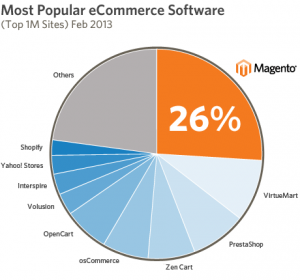
Magento’s marketing team just released some heartening news regarding everyone’s favorite open-source platform: as of February 2013 (and according to Tom Robertshaw’s quarterly e-commerce survey), Magento e-commerce continues to be the leading platform among Alexa’s top one million sites. Not only that, but this is their third consecutive year at the top!
For the uninitiated, Alexa is a noted web information authority and analytics database used by many sites to gauge their reach and popularity, both nationally and globally. According to platform signature survey results, Magento e-commerce secured an impressive 26% of Alexa’s top one million users. Moreover, this figure represents a 30% increase in market share year-over-year and it nearly triples the number of sites using the platforms in second and third place.
In greater detail, Magento’s figures are even higher for just the busiest 100K sites, boasting a 28% share, again outstripping second place by a substantial margin. What does Magento have to say about the results?
“Our business keeps growing for one simple reason,” opines founder Roy Rubin. “Our customers are succeeding.”
And there you have it! Can’t get any more direct than that—Magento enables users, and through them reinvents customer expectations for global e-commerce. Here’s to next year!
In the most recent incarnation of its exclusive ecommerce research project, Ecommerce Quarterly, Monetate, the marketing and website optimization firm, showed definitively that social media marketing is not the powerhouse tool many thought it to be, at least when it comes to last-touch attributions. The bold assertion is based on Q1 2013 data collected for this study which shows that social media outlets were responsible for only 1.55% of website traffic and a measly 0.71% of conversions. Is this a case of hard evidence disproving commonly held beliefs or is social media marketing getting a raw deal fueled by misused statistics?
Is Social Media Marketing Dead?
According to Nielsen’s “State of the Media” report for 2012 year–end, people spend more time on social networks than any other category of websites, and the numbers are trending even further upward for 2013. Furthermore, the Nielson Company’s report shows that as a category social media is still vital with new social networks, communities and forums still being created and embraced by the public. In light of these numbers and other anecdotal and experiential evidence, the EQ’s author contends that perhaps the EQ numbers aren’t telling the whole story, this may be a case of misattribution rather than social media being a poor marketing gateway. To illustrate; if one were to find out about a website on Facebook then, only after leaving the social network enter said website by typing the url directly into a browser that visit would be attributed to “no direct referrer” by Google, but is this truly the case?
Assist Interaction vs. Last Interaction
Google, in the analyzing channel contribution section of its analytics suite attempts to break the “path to a purchase” into two component parts: last interactions (defined as the interaction immediately preceding the conversion) and assist interactions (any other interactions). This, Mr. Baer posits, may explain the apparent contradiction: The EQ survey seeks to measure the impact of social media on conversions by measuring monetary impact which as Google’s apt definition shows may just be the wrong way to view social media.
So… to social media or not to social media?
The jury may still be out on how exactly to quantify social media as a marketing tool but it seems fairly evident that it does play a major role. In fact, according to Forrester Research, word of mouth advertising, of which social media is but one example, plays a part in over 80% of all purchase funnels. My recommendation is to take the EQ study at face value and move away from direct marketing on social networks, like social referred visits and similar tactics. Instead target your spending on generating buzz through coupons and contests which increase your visibility and make your company a topic of conversation. Until the science behind social marketing progresses and the true value of social marketing is revealed it’s probably best to spend your money on better understood avenues.
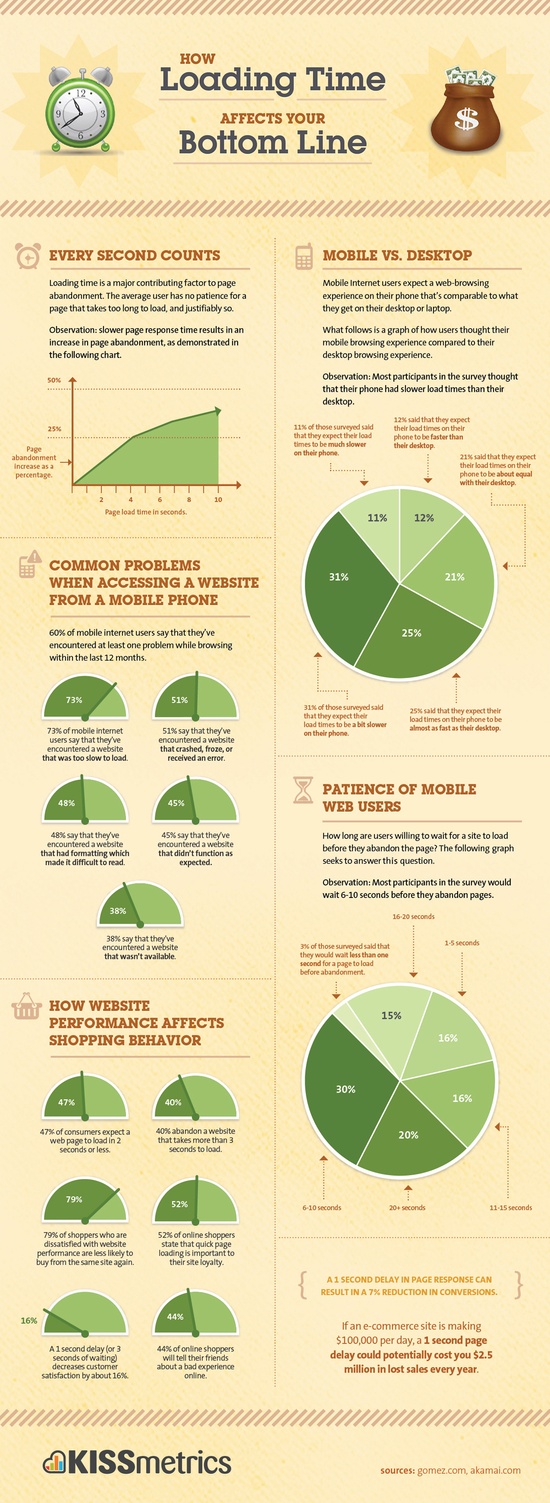
Getting the best possible hosting solution for your Magento company is vital, perhaps more so than any other single factor, for the success of your business. Did you know that a 1 second increase in page load times can result in
11% fewer page views
16% decrease in customer satisfaction
7% loss in conversions
Make certain that your Magento hosting solution is the best possible.
Continuing our exploration of the State of Retail in Q1 2013, let’s get right back to the metrics! Be sure to read Part I for a bird’s-eye-view of the situation.
Multi-Platform Online Retail
Tablets! You hear about them everywhere. Tablet ownership has now surpassed 60M people, just under half the 130M who own smartphones. Not a fad anymore! The sheer volume of devices, and the jump in devices-per-person, has had some interesting results:
• Comparing February 2013 with February 2010, total U.S. internet usage has jumped from 63B minutes to 308B minutes for smartphone users.
• This growth was mirrored, albeit to a lesser extent, in desktop users, jumping from 388B minutes to 467B minutes.
• Tablet usage is a new category altogether, accounting for 115B minutes in 2013.
• Altogether, usage nearly doubled from 451B to 890B minutes. Wow!
Commerce-wise, this rapid growth shows up strongly in engagement with U.S. coupon sites, where minute usage ballooned 530% in that same period, from 782M minutes to 4.93B minutes.
In a jaw-dropping development, nearly half of all digital time spent on retail properties now occurs via smartphone/tablet! How long will it be until desktops’ slim 52% lead gives way? And what do these retailers’ efforts look like to garner such engagement? Let’s take a look:
• The average Top 50 retailer extends its desktop audience by 45% via mobile channels.
• Amazon in particular has some astounding figures; its Unique Visitors in March 2013 nearly doubled (from ~85M to 164M) via mobile engagement.
• eBay enjoyed 20.68M mobile-only users in that same period.
eBay makes sure to capitalize on this constituency via multiple mobile-friendly endeavors, including:
• Ease of payment
• Barcode scanning
• Well-integrated platforms
• Mobile app real estate
Where does multi-platform commerce matter most? Daily deal sites and drugstores, of course! Groupon, LivingSocial, Walgreens, and CVS all posted amazing figures for the share of users’ time spent on mobile devices. A full 72% of Groupon’s users’ time originated from mobile. Wild!
More Mobile!
It goes deeper! Consider this: at $5.9B in Q1 2013, mobile commerce (m-commerce?) accounted for 11% of all U.S. retail e-commerce (this figure was actually reached in Q4 2012 and sustained into the new year). Let’s now compare retail spending growth by channel:
• Total retail discretionary spending growth increased a measly 1% year-over-year.
• The e-commerce segment grew a healthy 13%.
• Just mobile blows them both out of the water with 31% growth.
Turns out that tablets encourage spending more than smartphones, with 37% buyer penetration compared to 20% for smartphones. But smartphone users retaliated in Q1 2013 by spending an average of $139 per buyer, compared to just $91 per buyer for tablet users.
We can zoom in even further by parsing product categories. Apparel/accessories, home/garden, computers/hardware, and furniture/appliances/equipment all line up pretty close to the total digital commerce mobile share of spending at 5 to 7%. Event tickets, however, consistently see a much higher percentage of buying occur via mobile—around 15%.
And that’s it for this edition! Tune in next time for a Q2 2013 sneak peek at new development, growing trends, and blossoming technologies.